Welecome to Rhebar:
1. Unduh aplikasi "Openlabel" (di App Store atau Google Play)
2. Ketuk untuk membuka aplikasi dan ikuti petunjuk di layar.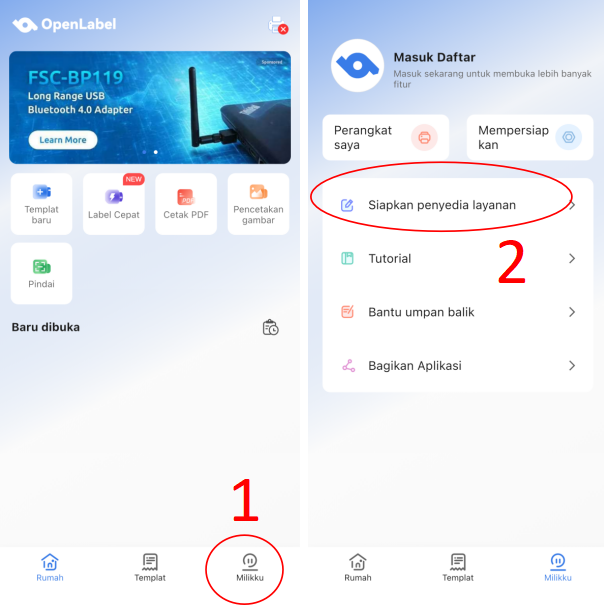
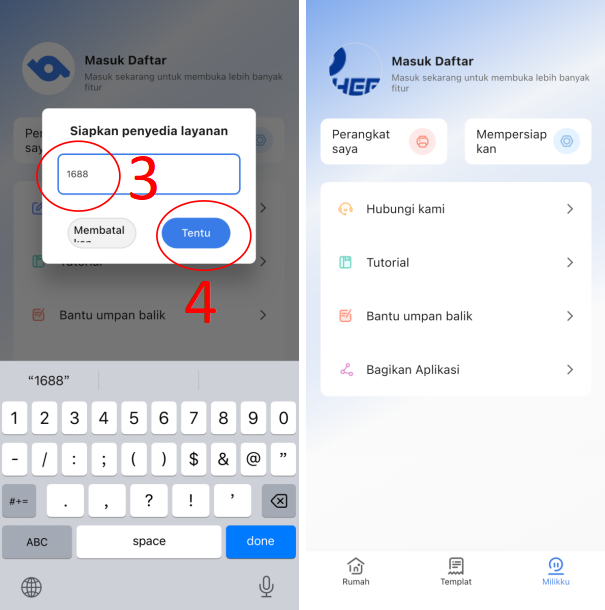
3. Lihat video untuk menambahkan watermark ke file cetak.TIPS:
If the video fails to load, copy the link to your browser.
https://youtube.com/shorts/v4z2JwAncc8
Was this article helpful?
That’s Great!
Thank you for your feedback
Sorry! We couldn't be helpful
Thank you for your feedback
Feedback sent
We appreciate your effort and will try to fix the article