Welecome to Rhebar:
1. Tải ứng dụng "Openlabel" (từ App Store hoặc Google Play)
2. Nhấn để mở ứng dụng và làm theo hướng dẫn trên màn hình.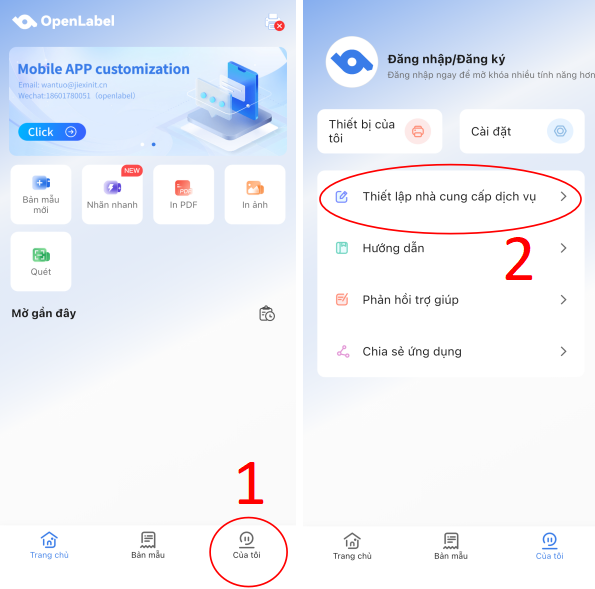
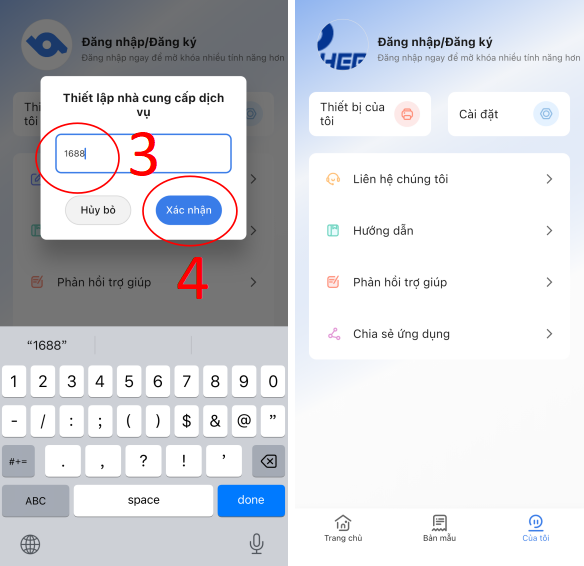
3. Tham khảo video để thêm hình mờ vào file in.
TIPS:
If the video fails to load, copy the link to your browser.
https://youtube.com/shorts/ueA8IjRaJH0
Was this article helpful?
That’s Great!
Thank you for your feedback
Sorry! We couldn't be helpful
Thank you for your feedback
Feedback sent
We appreciate your effort and will try to fix the article